

ISTANBUL
3D environment!
relationship between space and
life in the most qualified conditions.
CRO-MAGNON SIMULATION
WHY
We Istanbul Simulation
Before this technology, we could only present a project through floor plans, 3D renderings, material samples, and physical models. No matter how talented the designer is—or how accurate the plans are—it can still be difficult to communicate the full vision to someone outside the industry.Most clients aren’t construction professionals, and even for architects, it’s not always easy to truly understand and feel a space from a 2D drawing or a standard 3D model. That’s where WE Istanbul Architectural Sales Simulation comes in.Unlike traditional plans or static 3D models, simulation technology is fully immersive. In a way, we bring what’s in the blueprint to life. It provides a much more realistic and easy-to-understand experience of how the space will look, feel, and function in real life—so customers can make a more confident, informed decision.
Amenities
Facilities Features
The Facilities section is an interactive interface that showcases what the WE Istanbul project offers residents—everything available within the development. Here you can explore amenities such as playgrounds, a fitness center, swimming pools, sports areas, a sauna, shelter areas, and more.This section also helps connect indoor and outdoor living by showing how shared spaces and amenities fit into the overall lifestyle and layout of the project.
Environment
Analysis
The Environment interface provides an in-depth analysis of the WE Istanbul project and its surrounding area. What makes it different from other solutions is that these insights are customized specifically for the WE Istanbul development.Key information that buyers and investors typically want to know is compiled here and presented in a clear, easy-to-follow way.
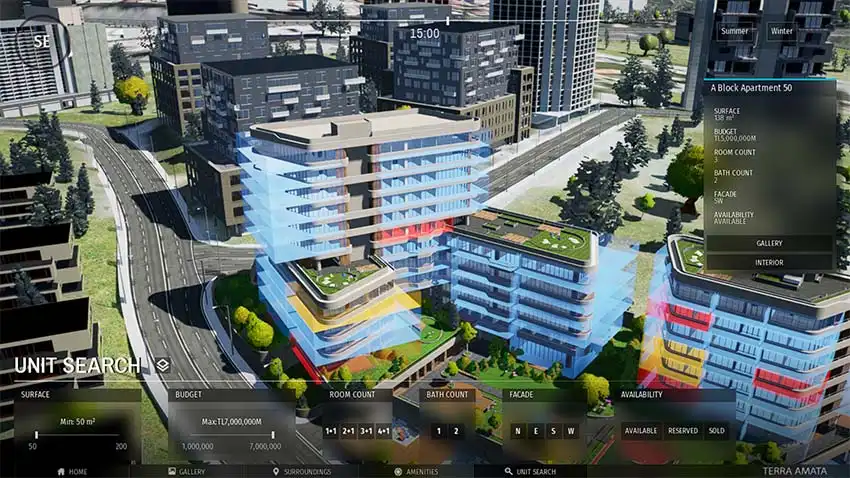
Unit Search
Partition Features
The Unit Search section displays all units and detailed information for each one. Units are color-coded for quick viewing:Blue: AvailableYellow: ReservedRed: SoldOn the right side, you’ll see details for the unit you select—such as price range/budget, number of bedrooms and bathrooms, unit orientation (which direction it faces), and availability status.You can also view the unit’s floor plans and images by clicking the Gallery button.Below, the filtering tools allow you to choose your budget, number of bedrooms, number of bathrooms, preferred orientation, and other criteria. Units that match your selections will be highlighted and listed on screen.